Insights for Leaders Navigating
Visibility, Credibility, and Growth.

From media strategy to reputation management, we explore the trends shaping public perception and share the approaches that drive measurable results for growing brands.

Microsoft Excel Tips for PR Professionals

Microsoft Excel has been a staple for my work in office environments, even after changing industries. I have needed Excel for multiple reasons, first in childcare management and now in my current role in a public relations firm. Excel is an essential tool for creating quality, data-related work, and I have found that even though I have Excel experience, my PR work has utilized functions in Excel that I had rarely used. This is because my past work managing our data would need a particular approach using similar data sets. But in PR, each client we work with has different quantifiable goals, meaning that we need our spreadsheets to be flexible but accurate.

Below are a few tips for beginners and important reminders for daily users to keep in mind:

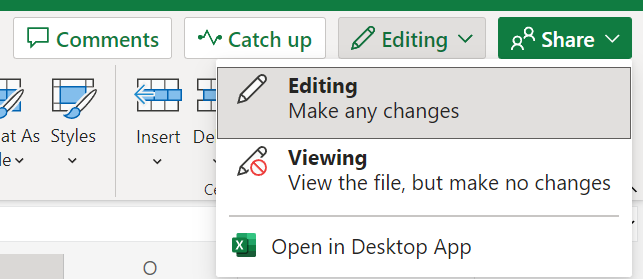
  • Know the limitations of the version of Excel you are using – For this tip, I am referring to working in Excel workbook in a web browser versus the desktop application. The biggest reason this tip is on the list is that many clients we work for, including Communiqué, are remote. Excel for the web is a fantastic tool, especially in the remote workplace, but it can have limitations compared to the desktop version. Even certain functions can behave differently in a browser window than in Excel. When working on a shared Excel, I recommend selecting the ‘Open in Desktop App’ option in review. The updates will be made to the shared workbook, but you will have the full capabilities of Excel. Microsoft has a complete list of differences on its website; click here to learn more.
 

  • Know when to use absolute vs. relative formulas – The most common formulas used in excel use relative cell references. These are basic cell references that adjust when copied or when using AutoFill. This is great to use in your spreadsheets but can create issues when you need the formula or a part of it to remain unchanged after copying. Using the ‘$’ symbol can let Excel know to keep the column or row reference as is, even when it is copied to another location on the spreadsheet. For example, to change the relative formula (=A8+B8) into an absolute formula where both the column and row are to remain unchanged would look like this: (=$A$8+$B$8). Like other Microsoft applications, Excel has many shortcuts to help users speed up their output when creating and updating spreadsheets. For formulas, you can use the F4 key after entering a cell reference to toggle the various absolute versions of that cell, then back to relative after all options have been cycled through. As the user continues to press F4, the formula will cycle from both column and row being absolute, to just the row, to just the column, then back to the initial written relative formula. Please note that pressing F4 changes only the cell reference directly to the left of your insertion point unless the formula is highlighted.           

  

  • Make the most of your tables – Depending on what type of work is being done with Excel, tables may not be an often-used tool because of how powerful a basic spreadsheet can be. However, Excel Data Tables offer valuable benefits. They assist with adding more rows and columns without needing to update references for formulas, formatting, filter settings and other items. By default, tables come with their own set of filters, which can be done without a table, but Excel allows only one set of filters per spreadsheet. Creating more than one table can allow the user the option to sort by each table, giving more flexibility in filtering the data.

 

The Table Design tab is where tables can shine in terms of ease and accessibility. The table formatting and design can be quickly changed as well as a few other options with a single click. This includes duplicate data removal, converting to a range or pivot table, and more.

Microsoft Excel is an incredibly valuable tool for even things like a simple checklist because it can help us better understand our data and help us stay organized. If you use Excel in any capacity, I highly recommend learning more about the program to help make it work better for your PR needs. Even if you have been using Excel since its debut in 1985, the program is constantly updating and improving, so there is always more to learn.

“Nothing to Envy”: Thoughts on Public Relations and Propaganda

Recently, I read “Nothing to Envy” by Barbara Demick. The book “follows the lives of six North Korean citizens over fifteen years—a chaotic period that saw the death of Kim Il-sung, the rise to power of his son Kim Jong-il (the father of Kim Jong-un), and a devastating famine that killed one-fifth of the population.”

Throughout the book, Demick shows how the government used a constant stream of propaganda to deceive and control a population of more than 25 million. Demick suggests that by eradicating the concept of objective truth, misinformation can completely control people.

My mind has been swimming for weeks as I’ve slowly read and processed “Nothing to Envy.” Looking at the book as a public relations professional, I can see how some people might misconstrue the purpose of PR and compare it to propaganda. But there are key differences between PR and propaganda.

Propaganda and PR do share some broad similarities: Both use mass media to shape perceptions, influence public opinion, and target specific audiences. The goal of both is to encourage people to take desired actions. Yet, there are intrinsic differences between PR and propaganda.

A quick Google search defines public relations as “the professional maintenance of a favorable public image by a company or other organization or a famous person.” Propaganda is “information, especially of a biased or misleading nature, used to promote or publicize a particular political cause or point of view.”

The most important difference is the truth of the messages. Propaganda relies on bias, half-truths and fear to influence the public’s attitude. Propaganda typically guides people toward an ideal, cause or political agenda. It aims to create a sense of “us vs. them.”

Propaganda is:

  • Aggressive
  • Focused on pushing an agenda
  • Intentionally based on half-truths and misinformation
  • Divisive
  • Used to damage and stifle opposing views
  • Oppressive
  • Designed to play on strong emotions
  • Incessant

PR is credible; it uses facts and showcases truth in a positive light. It’s based in the ethical, accurate presentation and dissemination of information. Occasionally, PR professionals engage in activity that aims to discredit a rival brand or company, but these practices are not in line with the industry’s code of ethics.

Demick argues that the North Korean government’s use of propaganda has created a vicious cycle. The state manufactures messaging to create desperation, instill fear and gain greater control, and North Koreans cling desperately to what the state tells them is the only path to salvation.

Pubic relations is not a tool used to oppress, divide and misinform people. Rather, it’s a mutually beneficial, two-way communication process between the sender (organization) and receiver (target audiences).

What Spaceflight Inc. can teach us about hosting an Out-of-This-World Open House

This September, the Communiqué PR team had the privilege of attending an exceptional open house hosted by our client, Spaceflight Inc.

Open houses are an excellent opportunity for key partners, customers and stakeholders to celebrate a company’s milestones and showcase new facilities or products. These events provide an opportunity to network, bond as a team and exhibit notable results and accomplishments.

Below are four tips for planning and hosting a successful open house, as demonstrated by Spaceflight.

Curate your invite list. Consider which stakeholders should be included. Your open house is an opportunity to celebrate your internal team, express gratitude to vendors and partners, and network with local officials and media contacts.

You should also acknowledge your community. If your open house is in a new city or neighborhood, consider including public figures such as city council members and local government officials. This helps foster relationships that are important for the company’s continued success and growth.

Engage the media. By inviting high-priority media contacts to your event, you can connect one-on-one with reporters who are interested in your organization.

Your internal team should recognize attending media contacts when they enter. Consider developing briefing documents that note which reporters are attending, what outlet they write for and their relationship with the company. Be sure to assign a team member to welcome media contacts, perhaps offering individual product demonstrations or a facility tour.

Prepare the internal team to host. While this is an event to celebrate the company, your team are hosts and should be prepared to greet guests, answer questions and network. To ensure the staff is prepared, take the extra step of providing a high-level document outlining key messages, best practices and potential questions. This ensures that staff accurately represent the company and feel equipped to host while enjoying themselves.

Showcase your products and services. Get creative in presenting your accomplishments. By finding ways to demonstrate your company’s products and services, you can provide guests with a hands-on experience and description of your solutions. This can be in the form of posters, scaled models or videos.

In the case of Spaceflight, the company told its unique story by exhibiting a scale model of the Sherpa orbital transfer vehicle. In addition, staff members were prepared to explain the product and address questions from guests.

An open house requires hard work and coordination. These best practices can help you leverage your celebratory event to foster relationships with key stakeholders and commemorate the opening of new facilities.

QorusDocs Secures $10 Million to Support Accelerated Demand for Proposal Management Software

On Oct. 4, 2022, our client, QorusDocs, a global leader in the RFP and proposal management software industry, announced it secured $10 million in additional funding led by WestRiver Group. The new investment will be used to address increasing customer demand for QorusDocs’ proposal management software in growing verticals, such as legal, IT services and staffing.

The company has experienced notable growth, with its user base expanding 255% year-over-year. Additionally, in 2021, the company supported the execution of proposals that valued $1.3 billion.

CEO and co-founder Ray Meiring attributes the increasing demand for QorusDocs’ proposal software to companies’ desire for tools that streamline activities, enable collaboration and clearly add value. And QorusDocs’ solution is proven to deliver value, helping businesses secure new revenue through winning proposals. In fact, according to a new study from QorusDocs, 60% of companies using proposal management software experienced higher business win rates, with a median improvement of 59%.  

For this announcement, the goal was to demonstrate the company’s momentum and the effectiveness of QorusDocs’ solution. To do this, we worked closely with the team to secure statistics that backed up the claims we made about growth and the success of QorusDocs’ software. Additionally, we wanted to highlight how the funding would be leveraged so the target audiences of this announcement would understand the company’s growth plans and the investment in the software.

To provide reporters with an opportunity to ask questions about the funding and secure Ray’s perspective on the market landscape, we offered the announcement under embargo to select reporters, covering technology, business, funding and local enterprise. We secured interest from GeekWire, Puget Sound Business Journal and TechCrunch. Below is some of the coverage generated by this announcement.

Congratulations to the QorusDocs team on the recent funding!


The Benefits of Talking it Out

Getting everyone on the same page can be a daunting task. If you work in public relations, you know people often see the world in different ways, which can make it hard to agree on a strategy.

Talking can help, of course. But according to scientists, certain types of conversations may hold the key to achieving group consensus.

A recent New York Times article highlighted new research that shows robust conversations free of “blowhards” not only help build group consensus, but those conversations can also actually synchronize group members’ brain activity.

A recent example comes to mind: A client was facing a crisis, and I had a clear idea of how I thought the company should respond. But I knew that the legal team might have another perspective.

With that in mind, we scheduled a Zoom call and aligned on a game plan. The call itself lasted about an hour, and it began with a discussion of a reminder of the goals we wanted to achieve. We then moved on to strategy, the pros and cons of implementing it, and discussed how it might help us achieve the goals.

Given this recent experience, I was interested in the article highlighting Dr. Beau Sievers’s research showing why talking helps, how groups achieve consensus, and how it impacts our brains.

Dr. Sievers’s study “showed that a robust conversation that results in consensus synchronizes the talkers’ brains – not only when thinking about the topic that was explicitly discussed, but related situations that were not.”

There is one important caveat, however. If a participant is so strident or opinionated that they don’t let others talk, coming to a consensus is much more difficult, if not impossible. Conversely, groups with mediators who encouraged others to articulate their ideas and then shifted their own were more neurally aligned.

While the study didn’t research the effectiveness of this approach in high-stakes situations, it has some helpful reminders for people looking to drive consensus, especially if they share a common goal. I recommend reading it and practicing drawing out others’ perspectives. You might devise your own  informal experiment to see if you can reach a consensus on the next steps within a certain number of discussions.

Finally, you can find the comprehensive research here if you’re interested.

PR Business Development 101

The PR landscape is becoming more competitive than ever. There are more than 54,000 public relations firms in the United States, and in 2022, the industry grew by 5.2%. Given the normalization of remote services, that growth is expected to continue. That makes clients more valuable than ever.

Clients make up the foundation of any PR firm, and business development plays a huge role in supporting a firm’s health.

At Communiqué PR, I have worked on several recent business development projects, helping with research, proposal development, scoping fees and presentation prep. This process can be time-consuming, but it’s crucial to success.

Based on this recent work, I want to elaborate on the two phases of business development and give you six tips for winning the business of a potential client.

Phase 1: Developing foundational materials

Foundational materials include a proposal and scope-of-work document (SOW). The proposal outlines potential goals, strategies and tactics for your client. It’s an opportunity to win them over with your creative and strategic vision.

A SOW creates transparency for the client, providing them a complete estimated breakdown of the number of hours and cost for each strategy and tactic.

These materials show a potential client that you understand their business and industry while establishing the credibility of your brand. They are tangible materials that help your client easily understand the proposed work.

Phase 2: Presenting your ideas

Creating the proposal and SOW is only half of the work. Some potential clients prefer that you present this information. Your audience may include not only your current point of contact but executives, members of their marketing and communications team and key decision-makers.

A presentation allows you to give more detail about your planned PR objectives and provides the audience with a better feel for your firm. It also gives prospective clients an opportunity to ask questions about your work. Nonetheless, presentations can make or break your deal.

Below are some tips to remember when presenting your proposal.

  • Tip 1: Make it shine. When pitching, come prepared with a presentation modeled on your proposal. Your presentation should be clean and professional in its formatting, a shining example of future work.
  • Tip 2: Summarize your speaking points. Avoid reading word-for-word from your slides. Elaborating on your points rather than reciting them helps establish your credibility. Pick three main takeaways for each slide. Write them down so you don’t forget them, but plan to have a conversation around them. This will make your presentation more natural and keep the audience attentive.
  • Tip 3: Practice with team members. Presentations often involve multiple speakers. You’ll want to practice the presentation with all team members more than once. Decide when each member will speak and assign slides to avoid any hiccups. To highlight your team’s knowledge and experience, divide the presentation based on each team members’ expertise. Practicing also creates opportunities to revise objectives, strategies and tactics. During practice, a team member might find a particular point invalid, or someone may come up with a new idea. Adjustments can be made easily when all members are in the same space.
  • Tip 4: Keep it conversational. Keep the floor open for questions, inquiries and additional ideas. This information can be helpful if you land the potential client. It also keeps the audience engaged and shows that you value input. Asking questions creates a conversational tone. Running straight through your slides without engaging your audience may cause them to lose interest.
  • Tip 5: Be confident. Confidence is key. Who wants to hire a partner that seems unsure of themselves or their work? Yes, pitching can cause nerves, but don’t let that affect your confidence. According to Psychology Today, people who act confident are perceived to be so. Believe in yourself and your capabilities. Your look can also increase your confidence. Dress for the part and appear as your most professional self. Lastly, be aware of your tone. Studies have shown that speaking in a lower, louder and faster tone can make you appear more confident.
  • Tip 6: Follow up. Your communication skills are your first impression, and the follow-up is the last. Make sure to follow up after your presentation to answer questions, send additional items and thank the potential client for their time. This allows them to voice concerns and share feedback. It shows you are enthusiastic about the opportunity to work with them.

Just like a marathon, business development takes practice and preparation. Don’t show up to your race without ever running a mile. Winning clients means doing your homework.