
Insights for Leaders Navigating
Visibility, Credibility, and Growth.
From media strategy to reputation management, we explore the trends shaping public perception and share the approaches that drive measurable results for growing brands.
Whether we’re kicking off an engagement with a new client or executing an announcement for an existing client, the first step is setting expectations and establishing what success look likes for our client. Depending on the company’s business objectives, an article in a top-tier business publication or a series of bylines placed in an industry trade could be exactly what they are looking for.
However, more and more we are finding that companies want to dig deeper into the results achieved and quantify the impact of a specific campaign. So how exactly do we do that? Do we track the number of shares an article has? Or perhaps we look at the number of followers the influencers who shared the article have on social media.
One thing is for sure: As PR becomes increasingly digital, tracking effectiveness and impact is evolving. For instance, a post shared via LinkedIn long-form measures the number of likes, shares, comments and views. This allows you to begin quantifying the impact of the article and understand the reactions to it. However, the question remains: How do we interpret this data? Is it more valuable to have shares because it expands the reach? On the other hand, a higher number of views could be considered more impactful because you know the audience engaged with the piece.
One alternative that we’ve found helpful, especially for clients that are not very familiar with PR, is comparing the cost of an ad in a publication to the cost of the PR service fees for placing an article in the same publication. I want to emphasize that this is not an exact science, however, it provides context for the client. In addition, it gives us an opportunity to highlight the added benefits of earned media vs. paid media. With an article, key messages are communicated and the company or spokesperson is validated because the information is through a trusted outside source. There are a variety of items to measure, but ultimately, it will be determined by the client’s needs and preferences.
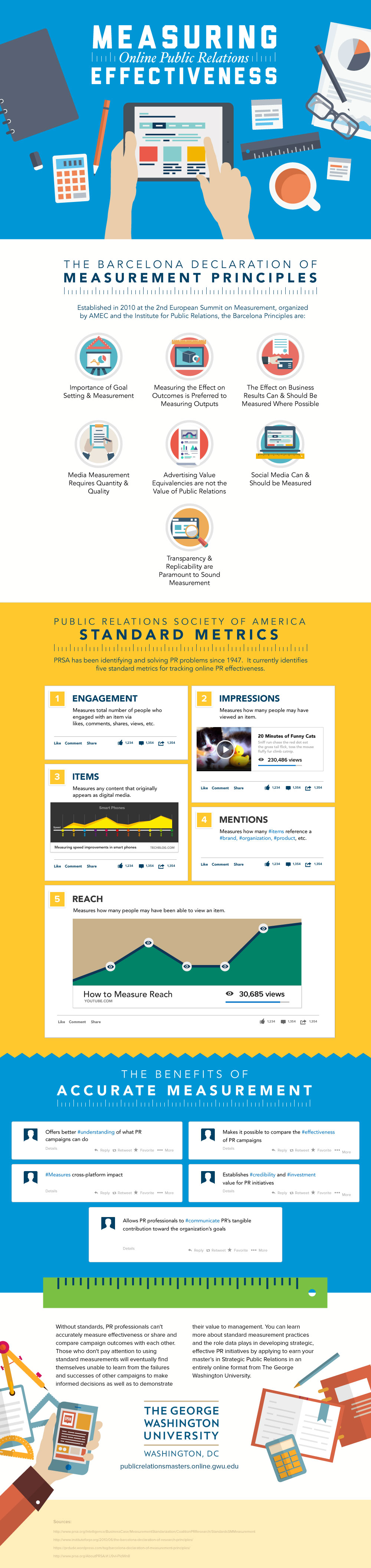
In order to provide you with more ideas on what to measure, we want to share a recently published infographic from George Washington University that observes outlined guidelines from recognized PR authorities, including PRSA, AMEC and the Institute for Public Relations.
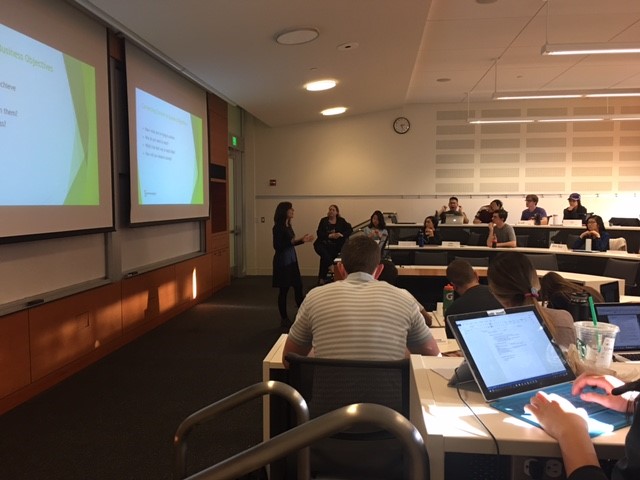
Earlier this month, my colleague Beth Mayer and I had the pleasure of presenting to a marketing class at the University of Washington. Specifically, our presentation focused on owned, earned and paid media – and how to leverage each to support a company’s business objectives.
As a former teacher, I enjoyed dusting off my pedagogical skills and collaborating with Beth to engage undergrads around the topic. From thinking through which examples would resonate (embarrassingly, Kim Kardashian made her way into the deck), to how to describe the benefits of each media type, it was fun for us to take a step back and unpack the role of PR in a company’s marketing mix.
In the professional world, it’s easy to get focused on the day-to-day tasks. But teaching forces you to take a step back. What are the implications of our work? And ultimately, how does it move the needle for companies? As an intellectual and professional exercise, teaching the class led to healthy conversations internally about the role and value of owned, earned and paid media.
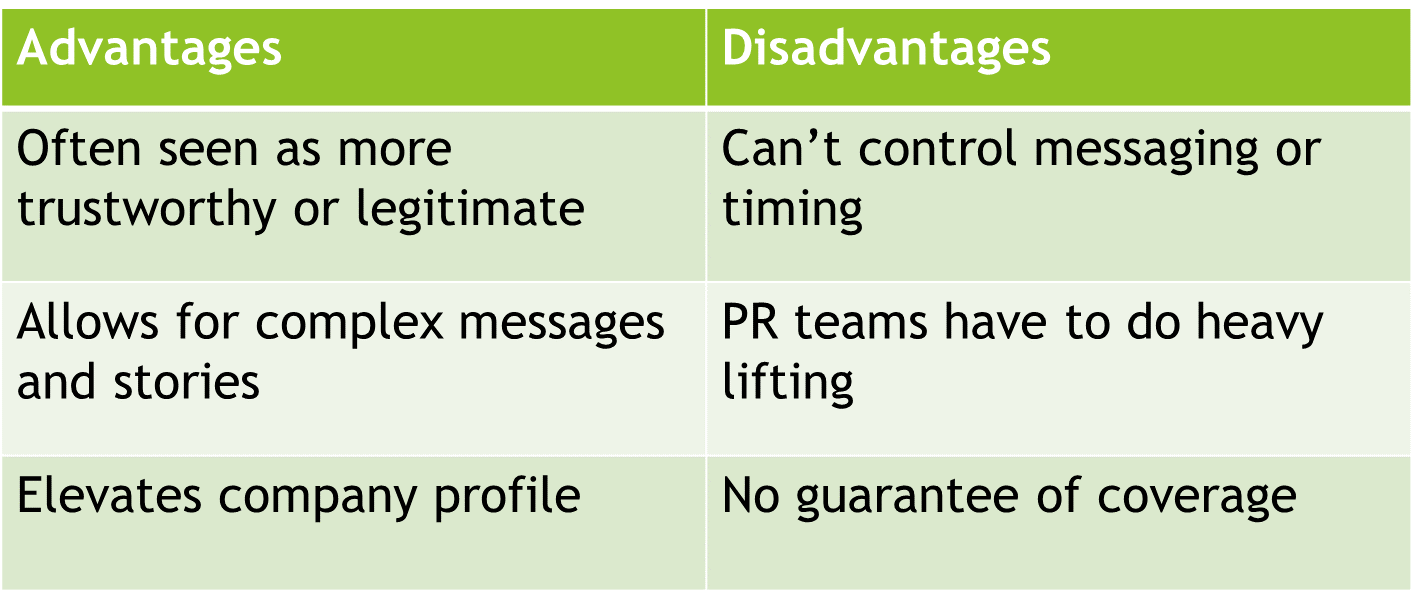
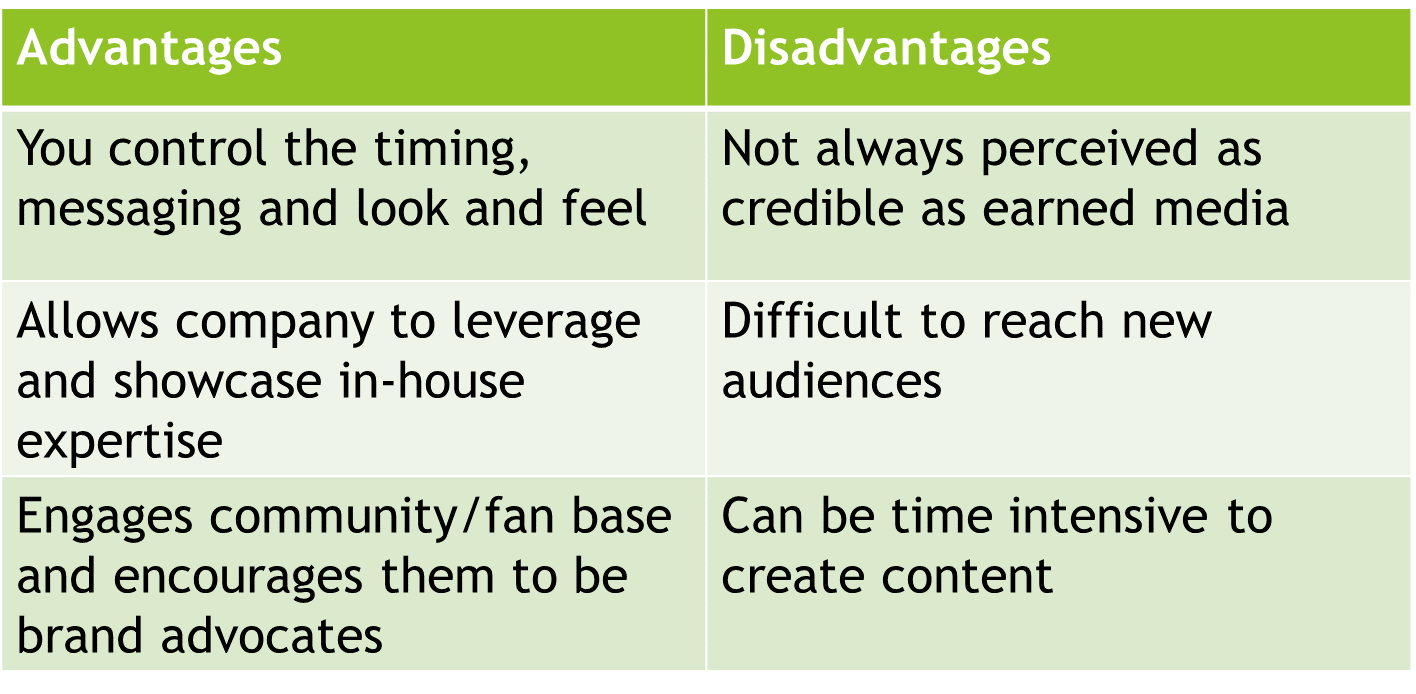
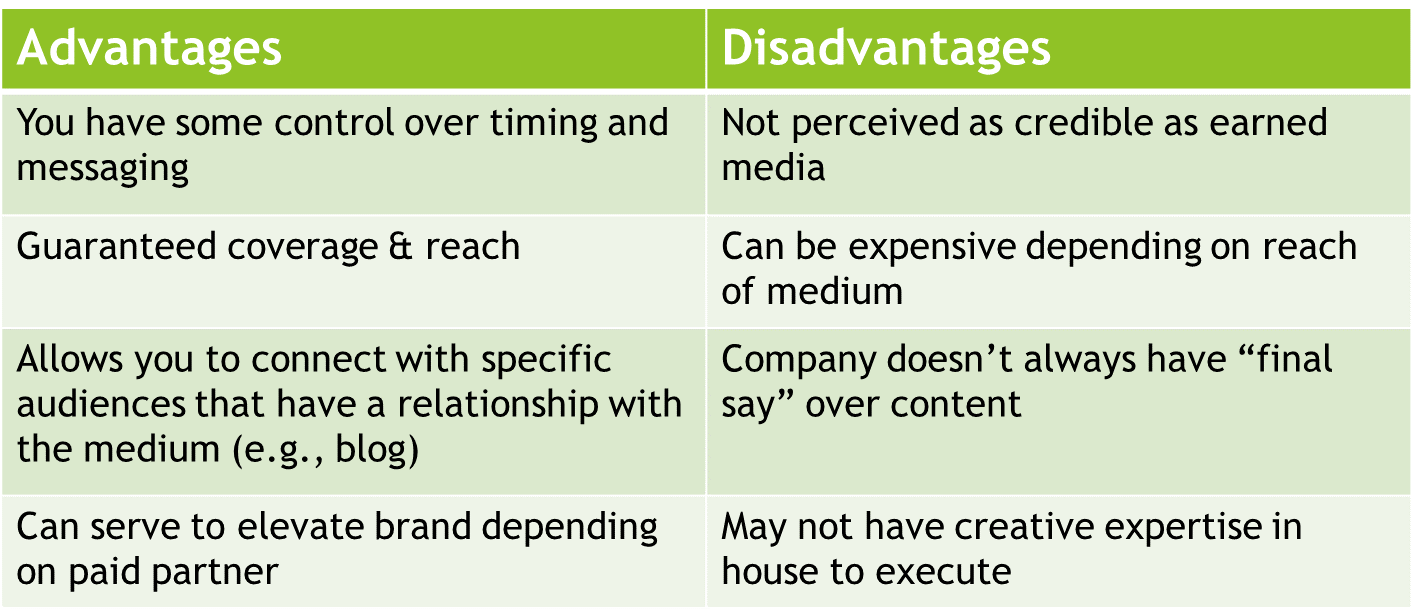
As part of our lesson, we analyzed the disadvantages and advantages of each media type – and how a company may choose to utilize each to achieve its objectives. Here’s a high-level recap of the advantages/disadvantages of each media type. How do you leverage earned, owned and paid media to achieve the right marketing mix for your company?
Earned Media – A Third Party Tells Your Story
Earned media is generally perceived as more credible than the other media types, in that journalists and editors choose to cover the brand and therefore validate its significance. Earned media also allows for more complex stories – consider a story in The New York Times versus a billboard. The former allows for a rich story, with nuances and different viewpoints. However, editorial staffs are spread thin these days, often leaving the heavy lifting to PR teams, who need to find third-party resources to serve as sources within a piece. There’s also no guarantee of coverage. Particularly with broadcast, a story may get bumped in the wake of a severe storm or – especially these days – political news.
Owned Media – You Tell Your Story
Owned media includes blog and social media content, as well as internal communications including company newsletters. The genius of owned media is that you can control it – the timing, look and feel, and content. The rub? To create content that’s of value, it should mirror earned media, leveraging in-house expertise and third-party resources to validate the significance of the story and add credibility to a company’s claims.
Paid Media – You Pay to Promote Your Content
Paid media’s value is determined, in part, by where a company is in its lifecycle. Particularly if a brand is well known, paid media can reinforce key brand messages and reach large audiences, depending on the medium. If a brand isn’t well known, however, it’s important to consider the value of an advertisement that can’t tell the brand’s story or fully explain its value proposition.
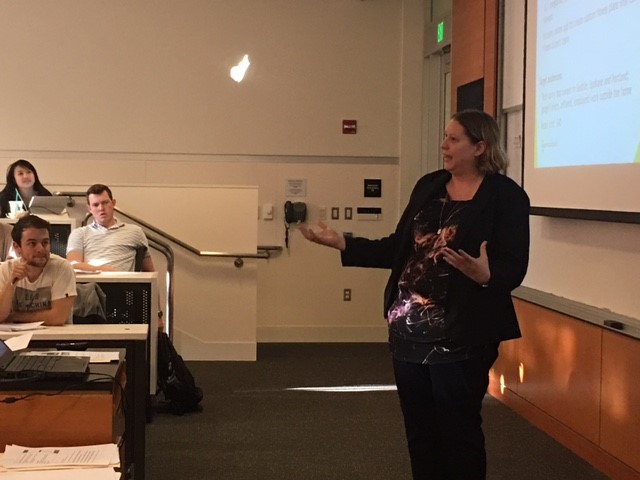
And, in case you’d like to see, here are some pictures of Beth and me in action. It’s heartening to see that the student on the bottom right does appear to be taking notes, not browsing the internet!

As the 2016 presidential election unfolded last Tuesday, many a jaw hung open in disbelief as more and more states turned red throughout the evening. When the results were in and the media confirmed that Donald Trump was indeed our 45th president, half the nation wondered how had this had transpired. Especially since many respected pollsters and news outlets predicted Hillary Clinton would win – The New York Times, one of our nation’s most trusted news sources, said Clinton had an 85-percent chance of winning. How did they, and every other major news outlet, get it so wrong?
The answer to this question is multi-pronged and complex, but part of the explanation pertains to the changing media landscape in our country. As the newspaper sector struggles to find new revenue models, newsrooms across the country have been shrinking and shutting their doors, leaving a workforce that is 20,000 positions smaller than it was 20 years ago. At the same time, social media platforms like Facebook and Twitter have become common sources for news about government and politics. It’s a significant shift in how we get the news and information that inform our opinions, and this election was the first time our country felt the full impact of it.
Major metropolitan dailies across the country have been steadily closing down for years. The list of deceased daily newspapers is depressingly long, including the Pittsburgh Tribune-Review, the Indianapolis Times, the Minneapolis Times, and the Tampa Bay Times, among others. This means that the media in America are now mainly concentrated in major coastal cities like New York City, Washington, D.C., and Los Angeles.
All of us are now well aware that our country is deeply divided: Coastal cities have radically different economies, lifestyles and political leanings than communities in the heartland of the country. The media are surrounded by likeminded people in liberal cities, so it’s difficult for them to understand the opinions and frustrations of people in other parts of the country. This is not an excuse for their shortcomings. It is the media’s job to represent all sides of the story, and there is no question that they failed in that regard this election season. But it seems that it would be easier for the media to have their finger on the pulse of what’s happening in Middle America if more of the media still lived in Middle America. Instead, they relied heavily on data guesstimating that Clinton would win.
The disconnect between conservatives and liberals is further exacerbated by social media. Facebook reaches nearly 2 billion people each month and has become many people’s main source of news. This is concerning for a couple reasons. First, Facebook doesn’t filter out fake news stories so people end up reading “news” about Pope Francis endorsing Donald Trump and other such untrue nonsense. Second, Facebook’s algorithm filters dissenting opinions out of our news feeds so we only see news stories and status updates that support our view of the world. Our news feeds are virtual echo chambers, and each time we open them we become more confident that everyone thinks the same way we do.
We need media to give us an accurate, unbiased picture of what’s happening across the country and the globe. But if the mass media business continues to decline, will they be able keep fulfilling this role? And will enough of the country tune in to mass media for it make a difference, or will we continue to become more siloed in our thinking by relying on social media platforms for our news?
The answers are unclear, but one thing is for certain: As we enter the Trump era, we need mass media more than ever to serve as a watchdog over our government officials.
Deadlines are an important aspect of any job and PR is no different. In a field that is fast-paced and news-driven, meeting deadlines can be the difference between a successful campaign and a failed one. Staying on top of different deadlines for various projects and ensuring everything meets those deadlines can be stressful and daunting, so here are a few tips to keep you ahead of the game:

1. Stay organized
You’ve heard this advice before, we all have. It’s been engrained in us since our first homework assignment was due. The reason “staying organized” has been following us around for so long is because it works. Unfortunately, it is easier said than done. The important thing is finding an organization tool or method that works for you. Some people might need a calendar that breaks down what should be completed by the hour, or some people might need to set alarms at weekly intervals before something is due to keep it fresh on their minds. Whatever method you use should keep you on top of your deadlines and help you avoid any surprises.
2. Break the project down
The saying goes, “You can only eat an elephant one bite at a time.” If you are starting a challenging new project, the best approach is to break it down into manageable pieces. Imagine you are about to start an embargoed pitching campaign around a product announcement for a client: You can break that down into researching the product, building the press list, creating the embargoed pitch, getting approval from the client, pitching, and follow up. Breaking the project down and focusing on one aspect at a time will help keep you organized and make the project less daunting.
3. Develop a well laid-out plan and delegate
After you’ve broken the project down, create a work-back plan. Make sure there are clear goals and specific dates for each section of the project and deliver the complete timeline to your client before you start the project. Set realistic expectations for yourself and for your clients. Based on previous projects and your experience, you can estimate how much time each section will take you, and use that to estimate the total project time to deliver to your client. You can create mini-deadlines for each individual section, which will give you a good indication of whether you are on track to meet your hard deadline.
Creating a clear timeline will also help you delegate tasks when necessary. Delegating can be a great way to take some of the deadline pressure off of your shoulders and ensure the project is completed on time. Assign some of the smaller sections to an employee, but make sure they know the deadline for their assigned section by walking them through the timeline and highlighting key dates for their portion.
3. Make sure you have the time and budget a little extra
Before you even accept a project from a new client, you must ensure that you have enough time to actually do it. It can be extremely hard to turn down a project, but it is far better to turn a project down than fail to meet the client deadlines and hurt both you and your company’s reputations. If you are working two projects that are due at the end of the month and are considering a third, maybe it would be better to decline the new offer and ensure that your current projects turn out perfectly.
That being said, when you do accept a new project, you should budget a little extra time as a cushion. Take the project breakdown mentioned before and add an extra hour or so to each section. If you know it will take 6 hours to develop a press list, give yourself 7. This will add a nice cushion to the whole project in case of a surprise, and the client will be pleased if the cushion isn’t used and the project comes in under the expected budget. It’s a win-win.
Deadlines will always be a critical aspect of any career, but if you manage them appropriately they have the potential to make you more efficient and productive. The biggest mistake you can make is biting off more than you can chew – know your limits and your abilities and be sure to stay within them. As long as you are organized, the plan is well thought out, and you have the capital to complete the project, meeting client deadlines should be a breeze.

In public relations, we do a significant amount of writing. A large percentage of every work day is spent crafting emails, press releases, articles and plans. These documents must be clear, persuasive, demonstrate valid reasoning, and be grammatically correct.
For me, writing is like working on a puzzle. Each word, like a puzzle piece, needs to be placed in the right spot – for clarity, conveyance, and to support an argument. Sentences and paragraphs are arranged and rearranged until the picture is clear and complete.
Also, like a puzzle, its best to assemble the edge pieces first. By this, I mean first come up with the outline or thesis for your piece and, only after you feel good about it, should you move on to bring the subject to life with examples, concreted details and commentary.
Finally, once the first draft is complete, step back to admire and review it to see if you can improve the vocabulary, structure, style and tone.
Many times, writing can be challenging. For instance, when ghostwriting an article for a CEO, you have to come up with compelling content and present it in a manner that is authentic to his or her style and tone. This means you need to know how the executive likes to construct an argument. It is also valuable to understand the person’s lexicon and personality.
Capturing your client’s unique voice and style will go a long way toward producing content that he or she feels confident about making public. So how does one do that?
Here are some of my thoughts based on more than 25 years of experience working in public relations and strategic communications:
1) Experiment with style and consider A/B testing. Recently, we produced two versions of an article and sent both to our client. Option A contained short, concise paragraphs, whereas option B followed the Jane Schaffer method of writing and had longer, more formally constructed paragraphs. We asked our client which style he preferred. Now moving forward, we have a stylistic model we can follow.
2) Pay attention to your client’s vocabulary. What words does your client use to describe his or her business? What experience or connotations do those words create for you? How do others perceive the language?
3) Collaborate with your client to come up with the right image, examples or idioms. Before sending over the first draft, consider picking up the phone to discuss how to best illustrate your key points. Statistics, examples and metaphors are essential to supporting an argument or bringing a piece to life, and it can be helpful to know which ones resonate with your client.
4) Scrutinize the structure of your work. Do you have the information in a logical, compelling order? If you re-arranged the structure, would the article or email be stronger or weaker? If you are writing an article, will your client like the placement of the nut graf? And remember: It pays to read your piece out loud. If you stumble, it’s likely your reader will as well.
5) Consider the tempo of the words and argument. Does the article move along at the right pace? Sentence and paragraph can play a role in the cadence of a piece. Be careful not to over-explain, which can slow the reader down. Finally, you want to anticipate and address the questions readers may have.
In closing, as you review your work, ask yourself one final, but important question: Can you articulate a rationale for each area of writing – content, grammar, vocabulary, organization, style and tone? After all, as the narrator, you have made deliberate choices in the construction and composition of your piece. Your choices should be reasoned ones versus decisions made without forethought.
For more tips on writing, please check out the following article:

Twitter Analytics is a feature on Twitter that provides businesses with the ability to measure post results, boost target-marketing campaigns, and evaluate the impact each posts has on its audiences. Anyone with a Twitter account can access and utilize Analytics, however, this feature is especially helpful for businesses and influencers with the goal of increasing engagement, tracking the influence of posts, and building relationships with target audiences. Twitter Analytics provides users with a summary of the number of tweets posted, number of profile visits, impressions tweets have received, follower count, and the number of mentions, replies and retweets.
Twitter Analytics offers three dashboards to optimize results: tweet activity, followers and twitter cards. In order to maximize the benefits and effectively track metrics, it is important for Analytics users to familiarize themselves with ins and outs of the dashboards and the vocabulary used:
- Tweet activity: This is the main portal to measure engagement with your followers. Analyzing the type of tweets that were successful and content that was unsuccessful will help to improve future posts and goal setting for campaigns. Measuring these results will help businesses and influencers edit strategies to align with what brought the best results, aka the types of posts their following prefers. A helpful feature with tracking engagement is the ability to break down each post: How many link clinks resulted? Who clicked on the link? Who didn’t? Was this post retweeted? Why or why not?
- Followers: This dashboard provides the ultimate view into your audience. Tweet activity and the success of posts relies heavily on content, however, “great” content to one demographic or target audience may not be considered “great” content to another viewer. Understanding who your audience is will help target campaigns and understand where to invest resources. The followers and audience portal will give insight into the interests, location and demographics of your following.
- Twitter Cards: These “cards” are essentially enhanced tweets that allow you to include images, video, audio and downloadable links to each 140-character tweet. After analyzing the data from your tweet activity and followers, you will know if twitter cards are right for you based on your followings’ engagement with visuals and audio content. Twitter cards increase engagement from tweets, drive application downloads, and provide another way to measure results through link clicks, image downloads, app install attempts and retweets. To view the different types of cards available and to understand which is best for your industry and audience, visit Twitter’s developer site.
Another helpful aspect of Twitter is the Quick Promote tool. The ability to transfer successful content into an advertisement, without leaving the app, has become an attractive and necessary offering by social media accounts within the last few years. Instagram Business profiles launched a similar feature, enabling business accounts to transform successful posts into ads by the click of a button. The ease and ability to do this helps expand the reach of a post that has already been tested and proved as successful by the original followers who likely make up the target demographic. This feature saves resources, preventing advertising and marketing teams from having to recreate ads and duplicate design efforts.
Altogether, implementing Twitter Analytics helps marketing teams develop and maintain a strategic approach to performing social efforts and setting and achieving goals. Taking the time to understand your audience, study, and invest in the types of content that resonates best with them will provide businesses with a loyal following, not to mention that followers will turn to the business account for news, entertainment, advice and resources (depending on the industry). Twitter Analytics provides users with transparency throughout each step of the campaign; tracking these metrics and comparing results overtime will help perfect strategy for developing future social media campaigns.
Businesses who’ve built relationships with their followers and understand the types of posts they prefer to interact with will have a better grasp of toward where they should dedicate dollars and if Twitter is even the right platform for relationship building with their target audiences.