
Insights for Leaders Navigating
Visibility, Credibility, and Growth.
From media strategy to reputation management, we explore the trends shaping public perception and share the approaches that drive measurable results for growing brands.
We’re all human and very rarely does anyone produce an article, press release, internal communication plan or any other form of written work free of errors right out of the gate. This is why the review process is critical. At CPR, we make it a best practice to have other team members review important materials before sending them to clients to prevent embarrassing errors.

But even having several eyes review a document is not a perfect system. I once did a final review on a press release only to realize that the contact information was wrong. It is sometimes the most obvious items that escape even the most critical eye. I came across an article on Ragan’s PR Daily written by Daphne Gray-Grant that offers 10 proofreading tips that are especially helpful and easy to incorporate into your proofreading habits.
Consider the following:
1. Allow at least one day to pass before proofreading. This can be challenging, especially if you work in a deadline-driven environment. If it is possible, your fresh eyes will be able to catch unconscious mistakes that many of us are guilty of. For example, typing “thought” instead of “though.” If you can’t wait a day, I would recommend having other members of your team proofread your work as they are likely to have a different perspective.
2. Print it out. This will make many environmentalists cringe, but you will catch more errors if you print out your document and proofread in hard copy. With handy tools such as tracked changes, most editing is done electronically. But Daphne Gray-Grant writes, “the human eye reads material on screen much more quickly and less carefully.”
3. Use large font. If you are unable to print out your document as suggested in tip two, use a large distinctive font such as Papyrus 20 point when reviewing material on screen. This will make it easier to catch errors that could slip by.
4. Question facts. In addition to unconscious mistakes and typos, addresses, dates and titles are often goofed up. Most proofreaders will trust that this type of information is accurate. The most common is to mismatch days and dates. Be sure to double check the accuracy of your facts.
5. Pay attention to the obvious. Similar to dates and addresses there are other “invisible” items that are often overlooked. Daphne sites an example where the client’s name was misspelled in 48 point font. We often put too much trust in the obvious items such as titles and contact information, but that should always be given a scrupulous eye.
6. Begin at the end. This is a tip that I have not yet tried, but like the idea of. Daphne suggests that professional proofreaders often read documents backwards line by line. This will keep the focus on grammatical errors instead of content.
7. Put a ruler under each line. By putting a ruler under each line that you read, it will help your eyes from jumping ahead to the next line.
8. Consider what you might have left out. When crafting emails or pitches, it is sometimes the most obvious elements that are omitted. I am usually so focused on getting all of the details right that I forget to include a phone number or require an RSVP. After you craft your pitch or invitation, double check that you have not left anything out. I find it helpful to ask yourself, what would I need or want to know?
9. Make a list of common errors. Making a check list of common errors helps give you something to look out for. After you make the list, check your document for those you have specifically listed. For example, using “their” instead of “there” or “its” instead of “it’s.”
10. Read your work aloud at least once. By reading your work aloud, you’ll get a feel for how it actually sounds and will catch more errors. This is my favorite trick and what I find most effective when proofreading materials.
While these are great tips to help you catch mistakes and avoid embarrassing errors, my number one recommendation is to have other team members review important documents. It is helpful to have multiple folks review docs. And if everyone from your team is implementing some of these techniques, you are more likely to catch those sneaky errors!
What techniques do you find most effective?
Last week I had the opportunity to hear Jennifer Seymour, director of content strategy and integration with Seattle Children’s Hospital, and Cory Badger, vice president of corporate and strategic business development with Regence Blue Shield, speak over lunch at the Puget Sound American Marketing Association Healthcare Special Interest Group (SIG). Both presentations were informative.

Since we work with the team at Seattle Children’s, I thought I would share a few of the points from Jennifer’s presentation on “Building an Online Audience One Story at Time.” I think her story and tips are applicable to many PR or social media managers working to add value to online communities.
Jennifer began by sharing information on the history of the organization’s Facebook page, which was born in June 2008 with the goal of increasing engagement and awareness among prospective patient families. Created by the web department, the Facebook page came to be managed by the PR department. (This was prior to the creation of Seattle Children’s content strategy and integration team, which now manages the page.)
About a year ago, in October 2010, Jennifer and team decided to undertake a survey to uncover more about Seattle Children’s followers. By leveraging Survey Monkey, they gained new insights. They learned that 73 percent of the hospital followers were related to or close to a patient. Almost 17 percent were employees, 14.9 percent were guild members or volunteers, and 11 percent were donors.
These results were significant. Given that so many followers already had a connection to Seattle Children’s, Jennifer and team decided to now focus on sharing compelling content to deepen connections with Seattle Children’s.
Some of the ways that Seattle Children’s is driving more meaningful engagement with followers includes live chats with physicians and sharing tips for keeping families safe. Last summer, the team shared a reminder with parents that screens on open windows are terrific for keeping bugs out, but screens don’t prevent children from falls. They then posted a video with tips for preventing these accidents and received many comments on the post, including one from a mother who immediately went to the hardware store to buy special window locks.
Jennifer noted how rewarding it is to the Seattle Children’s team to use Facebook to help prevent accidents, and in terms of return on investment noted the seamless alignment of these results with the hospital’s mission.
In December 2010, Seattle Children’s also worked to raise donations via its Facebook page. In three weeks, the nonprofit organization received 172 donations and raised $24,365.
Jennifer summarized some of the keys to success on Facebook as follows:
• Have a great brand
• Encourage folks to share their stories
• Adopt a warm, caring, fun and inviting tone
• Answer questions (this takes time, but is worth it)
• Ask questions
• Thank others for mentions
• Consider Facebook advertising (Seattle Children’s has found this to be very helpful)
• Develop and share authentic content
• Find a balance in how often you post
• Become a curator of content
• Try new things
• Make it someone’s job
Today, Seattle Children’s has more than 25,000 people that “like” them and has seen a 150 percent increase in fans since the end of 2010. We look forward to seeing this growth continue and hope the PSAMA will invite Jennifer back to give another update next autumn.
Jennifer Gehrt
I can still hear my former professor repeating to the class, “Connections, connections, connections.” Though my classmates occasionally grew tired of this advice for starting a successful career, I certainly benefitted from the repetition. What I learned from my professor is that one of the most valuable tools when seeking and maintaining a career is, indeed, connections.

In the class, we discussed many social media sites, including LinkedIn due to its facilitation of professional connections. As an avid user of LinkedIn, I constantly receive email updates announcing various website enhancements. It has been particularly interesting and impressive to see the recent, increased attention LinkedIn directs toward enhancing features for companies using its networking capabilities. With a growing number of individuals and companies joining the website (there are currently more than 2 million listed companies and more than 100 million members), LinkedIn has improved its platform to focus on companies and boost their presence on its network.
In the past, LinkedIn had more focus on individuals and little reason for companies to pay much attention to their presence on the networking site. With new enhancements and features for companies, that has changed. It is therefore crucial for companies using LinkedIn to gain a good grasp on these enhancements so it is possible to optimize their profiles and improve visibility on LinkedIn. A few good tips on developing a stellar company profile can be found here.
LinkedIn is a unique service in the social media landscape and the recent enhancements herald user-friendly features seen on other websites such as Facebook and Twitter. In 2008 for example, LinkedIn introduced company profile pages to allow companies to provide relevant information about their organizations. In 2010, LinkedIn introduced a feature to “follow” these company pages. This is similar to how one could follow a company page on Facebook or a company’s Twitter account. To deepen the professional-to-company connections, LinkedIn recently introduced another feature that makes having a company profile even more valuable.
On Oct. 6, LinkedIn launched a feature called “Company Status Updates,” which provide a way for companies to become more engaged and connected with their communities of followers. LinkedIn outlines the benefits of the new feature this way:
“Company Status Updates are a powerful new way to engage directly with your followers. Influence consumer perceptions and purchase decisions by messaging followers across LinkedIn and the Internet. Post relevant updates, like company news, product promotions, videos, and industry articles. Amplify your brand message and benefit from follower engagement (likes, comments and shares), interactions that are virally distributed across a follower’s networks.”
For companies, this means they can tactfully share any important insights and news to their followers, who then may comment, like or share the status updates from their personal accounts. This new feature makes it easier for companies to communicate with their LinkedIn audiences about anything from job postings to new business achievements. Overall, these status updates allow companies to strengthen connections and gain visibility, as well as engage with customers, former employees, recruits, potential partners and others. Professionals already following companies on LinkedIn using the “follow” feature will begin receiving status and news updates from the company directly on their LinkedIn home pages. For more information on company profiles and status updates, go to LinkedIn’s learning center.
LinkedIn seems to be combining many of the best qualities of Facebook and Twitter to enhance its features for companies. It has employed these new social media features to help foster stronger connections, uphold transparency and gain visibility, while maintaining its own unique platform. The changes also showcase the benefits for companies that have a presence on LinkedIn.
LinkedIn would undoubtedly receive approval from my communications professor regarding these recent changes. They not only enhance the overall platform, but create an environment to foster connections for business professionals and now companies as well.
Katherine Turney
In the age-old tussle between public relations practitioners and the media, pitches take considerable heat. In fact, a blog is devoted to bad pitches.
Previously, I worked for a large organization in a small town. The local newspaper wanted story ideas – it just wouldn’t accept ideas that came directly from the organization’s communications office; the paper has an unofficial, though frequently cited, policy against publishing information that came from press releases. The organization, on the other hand, requires media to work with its communications office if it wants news.
Two conflicting needs arose: the newspaper wants “unique” news that no other outlet will receive; the organization wants to share its news with local audiences as well as in a larger geographical area. What was a PR practitioner to do? One strategy we incorporated was to “pitch” media through social media, a practice we found to be successful.
In general, PR practitioners may find media receptive to pitches through social media because inboxes may be flooded and social media is easier to wade through. In addition, reporters may be monitoring social media to stay on top of news.
“Though traditional media is sometimes still a more trusted source of information, I have found many journalists to be more accessible and attentive over social media than email or voicemail/phone,” says Corina Newby, a communications officer at Supernova in Toronto, Ont. “Social media is my go to for anything requiring me to quickly access key influencers, and initiate a viral spread of information.”
Here are a few tips.
- Establish relationships on Facebook and Twitter with the media. Follow them and engage with them, before you reach out to them with a pitch. Don’t let your social media relationships become a perpetual request to have the reporter do something for you. “I’ve used Twitter to introduce myself to editors that I didn’t know before Twitter, which then led to a soft email introduction, then to an actual face-to-face meeting,” says Mike Phillips of The Neo Com Group in Portland, Ore.
- Post thought-provoking, heart-tugging, sexy, timely or otherwise interesting content. (Here are a few tips on what makes a good story.) Not only does this capture the attention of media, but it also reaches your general social media audiences and takes your message further.
- Be succinct. The beauty in Twitter is that it requires people to keep messages brief. With Facebook, the tendency is to post longer messages simply because there is more space.
- Keep the content flowing continually. Have a plan for social media and stick to it, even during organizational transition.
- Don’t overtly call the media out when you post. If you’re creative enough or the news is captivating, they’ll notice. (Notice we started this list of tips out by listing “pitch” in parentheses – it’s because you need to engage in such a way that media don’t need to be flagged for the story because they’re already attuned to what you’re saying.)
- Avoid sending direct messages to media through any social media channel. Again, providing news and feature ideas through these channels is meant to intrigue them, not harass them in a way that makes them want to disengage.
- Be attentive. Follow your target media’s social media channels. Seek those opportunities to engage with them on their terms – be a resource for them when they ask a question or are looking for sources.
Not sure this strategy will work? Here are some successes:
- Jolene Miklas, director of communications at AnimalFriends in Pittsburgh, Pa., shared one of her successes. In June 2011, they conducted a large-scale cat rescue. “We knew the rescue would be expensive. We needed donations, and we needed to get the word out immediately,” she recalls. “Instead of sending a press release, I posted the story to our blog, Facebook, and Twitter. The story exploded and within hours we had TV, print and radio coverage.”
- Contstance Aguilar, a social media specialist and account manager for Abbi Public Relations in Reno, Nev., helps manage a tech client’s Twitter account. “It’s mostly for communication to fans and posting industry news and insights, but I did use it after the South By Southwest Conference to re-connect with a journalist at Entrepreneur Magazine,” she notes. “Through that initial connection, which was very in-depth and pertinent to the tech industry, which she covered and I was pitching, I was able to not only create a relationship that landed said client for an upcoming story in the magazine, but also set up two more clients for meeting with her, which resulted in a story that’s already been published.”
What are some of your successes or tips?
Related blogs:
- Check out Pop Culture PR Lessons for some tips on media strategies and relationship building.
- Are PR firms still great sources for media? Check out PR Firms and Media: A Symbiotic Relationship for some insight.
By now, we’re all aware of the benefits of social media. We’ve said it before and we’ll say it again: Social media is a powerful tool to connect with your target audiences, increase brand recognition and convey key messages. If you’re strategic and willing to make the time and resource investment, you can build a social media following of loyal brand ambassadors. However, it’s important to remember that while social media gives us the power to share, for better or worse, it can also give us the inadvertent power to conjure a storm. This past month, I learned several lessons around just how powerful social media mobs can be.
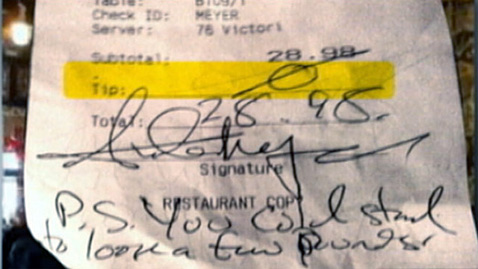
You may have seen the various stories around a local Seattle bartender who received a most unwelcome tip after serving a patron. The customer left her with a big goose egg in gratuity and the message, “You could stand to lose a few pounds.” Naturally, the bartender was outraged and took to social media to air her grievances. Almost immediately, her social media following went on a manhunt to identify the customer and shame him into apologizing. The only problem was, her angry Facebook mob was unleashed on the wrong guy and the bartender immediately went from innocent victim to wrongful accuser. Clearly, this is yet another reminder to check your facts and check them again. But, it’s also a painful indication of what can happen when you underestimate the sheer power that social media can have.
In another event, one of my favorite bloggers, The Bloggess, had a rather unfortunate run in with a PR guy after she turned down an unsolicited and irrelevant pitch. The guy, who also turned out to be the vice president of the PR firm, inadvertently hit “reply all” when calling her names that I won’t dare repeat. In true Bloggess fashion, she turned to her large and loyal following and with one Tweet, the PR firm was publically shamed. In today’s social media-dominated world, private conversations can easily become public and one false move can be detrimental to your reputation.
Both of these scenarios clearly demonstrate how powerful social media mobs can be to support different causes, whether for good or bad. However, harnessing the power of social media comes with great responsibility. In these situations, the rise of both social media mobs were initiated by simple human error, a careless wrongful accusation and an unintentional “reply all.” While mistakes are bound to happen, it’s how we respond to them that matters. And at the end of the day, if someone really makes you mad, sleep on it before sharing it with the world. And while I think it’s best to refrain from sending scathing emails because you never know where they’ll get forwarded, if you have the unrelenting desire to send it anyway, triple check who you’re actually sending it to.
Monica Rodriguez
In the past we have written about the importance of body language, but the topic came to my attention again during the eighth Republican presidential debate, and the subsequent analysis of that debate, when Mitt Romney and Rick Perry got into a heated exchange.
Ann Gerhart with the Washington Post wrote a wonderful article about the situation and the implications of touching, asserting control and body language. Entitled, “Unwritten rules of debate: No hands,” it is an excellent reminder to those working to “win over” an audience.
After reading the article, I was again reminded how much body language conveys about emotion. Here are a few of the key reminders I took away from the article:
- Body language provides us with valuable insight into what a person is thinking or feeling. Consider Gerhart’s description of the situation in her article: “Peery had accused Romney of knowingly employing ‘illegals’ to trim his lawn, Romney was trying to respond, Perry kept talking, and Romney frustrated, reached over and laid his larger paw on the shoulder of the shorter man. Perry’s eyes blazed with anger; he jabbed his finger at Romney and continued talking.” If you have not seen this interaction, I’d encourage you to watch the clip and draw your own conclusions.
- Think carefully about your intentions – especially during emotionally-charged moments. What was Romney trying to do? In Gerhart’s article, Georgette Mosbacher asserts Romney was trying to calm Perry, while others interpret Romney’s move as one avowing dominance. We’ll never know for certain what Romney intended and I’d be willing to bet that the conflict escalated so fast that Romney himself wasn’t clear on this. Before taking action (verbal or physical), it’s probably best to pause and think about your intentions and whether your actions are going to help you achieve them.
- Listen to your coaches. In her article, Gerhart shares an example from a debate between Al Gore and George W. Bush. Against the advice of his coaches Gore invaded Bush’s personal space during one of their debates and it apparently backfired. Coaches are not always correct, but before one disregards their input, it probably makes sense to think long and hard about it and have a very good reason for taking the risk.
- Likeability is the name of the game. When you have two qualified candidates the one that typically gets the job is the one that is more likable. This is true in hiring, political arenas, and business development. And, even though journalists try to be impartial, likeability impacts how an individual is treated by the media.
The article contains many more interesting points, I highly recommend reading it, and the next time you’re working to win over an audience, please keep these tips in mind. In the dramatic moments of a personal attack, pause and take a deep breath, think about what you’re trying to achieve and respond carefully. Remember, if you escalate the situation (intentionally or not), it is likely to hurt your likability rating with your audience and likability is often the name of the game.