
Insights for Leaders Navigating
Visibility, Credibility, and Growth.
From media strategy to reputation management, we explore the trends shaping public perception and share the approaches that drive measurable results for growing brands.

“Guerilla marketing” is a way to generate buzz without instituting a hefty marketing budget. This method is oftentimes effective because it is attention-grabbing and easy to understand. Arguably one of the most famous guerilla marketing campaigns is the Oscar Mayer Wienermobile. The enormous hotdog-shaped car makes its way across the nation drawing attention from children and adults, stirring conversation and making for a memorable event.
Guerilla marketing is based off of several guiding principles including:
- The customer is more important than sales.
- Targeting individuals is more effective than targeting groups.
- Interactive campaigns in unconventional spots demand attention.
Guerilla marketing can positively position a company by portraying it as targeting the customer’s needs rather than their pockets. Customers that understand the message that a guerilla marketing campaign is portraying will likely spread the idea to their friends by word of mouth or social media, which continues to drive buzz for a company and generate media coverage. Marketing and public relations efforts, when tightly coordinated and in sync, are extremely beneficial in helping drive the success of a business.
Some good video examples of effective guerilla marketing can be found in the Mashable article, “10 Excellent Examples of Guerrilla Marketing Campaigns.” My favorites from that article include:
- Absolut Temptation. A box full of Absolut Temptation-flavored vodka was placed on a baggage claim belt in the Amsterdam airport forcing those waiting for their luggage to be “tempted” to grab a bottle. This campaign was very simple, yet effective, and drew a clear correlation to the idea of being “tempted” and the Temptation vodka itself.
- Nike Boot. On International Car Free Day, Nike placed a “boot” with a Nike running shoe on 100 cars along with a ticket, resembling a parking fine, to promote running instead of driving in Prague. The campaign played on the recognizable experience and added a little humor to create recognition of the slogan “run on air.” This is also an example of timing is everything.
- IKEA Everyday Fabulous. In the “Everyday Fabulous” campaign, IKEA invaded the streets of Manhattan by making little pockets of the city “homier.” For example, IKEA decorated a bus stop with a couch, throw pillows and curtains. By placing decorative items in plain sight, it helps demonstrate IKEA’s merchandise and keep it top of mind for consumers.
- Loctite Coin on the Street. Loctite Super Glue 3 offers the simplest example of utilizing guerilla marketing all while demonstrating the power of the product. For their campaign, Loctite glued a coin to the sidewalk and filmed as people tried to pick up the coin. The Loctite sticker was placed right next to the coin. The result? Dozens of duped passers-by left with the knowledge the Loctite Super Glue 3 works and the resulting YouTube video received thousands of hits.
- UNICEF. In 2010, UNICEF used a bottled water vending machine to convey a powerful message, how something we take for granted is not such a luxury in developing countries. The organization filled the machine with bottles of dirty, diseased drinking water that people in certain areas of the country regularly consume due to lack of a cleaner option. By raising awareness to the cause of clean drinking water in such a vivid and tangible manner, UNICEF saw the donations pour in. In addition, the stunt garnered significant media attention.
The phrase “guerilla marketing” was coined by Jay Conrad Levinson and defined in The Guerilla Marketing Handbook. In it he writes, “In order to sell a product or a service, a company must establish a relationship with the customer. It must build trust and support. It must understand the customer’s needs, and it must provide a product that delivers the promised benefits.”
If you are going to adopt a guerilla marketing campaign for your company, take into consideration how everyday people utilize your product or service, and how you can best demonstrate that in a fun or vivid manner to ensure the event makes a memorable impression on your consumers.
Do you have any guerilla marketing campaigns that you have found especially memorable? Please feel free to share them with a comment.
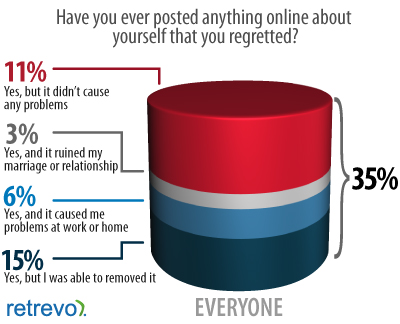
In fact, according to a recent study from Retrevo that looked at how people should use gadgets in their lives, 35 percent of people have posted something online that they later regretted and smartphone owners were twice as likely to post something they’d regret than non-smartphone owners. While in most cases, unintentional posts or posts that you wish didn’t publish don’t lead to dire consequences, there’s a growing roster of people who’ve been fired from their jobs because of social media outbursts.
Luckily, if you ever find yourself in a similar situation, all is not lost. While you might not be able to remove all the damaging content from the Internet, Mashable shares a few SEO tips and tricks to help you evaluate and improve your online reputation.
• Step 1: See Where You Stand – Google yourself. Yes, it’s that simple. Before you can manage your online reputation, you have to assess it. Type your name in search engines and set up alerts.
• Step 2: Post Positive Content – Reduce visibility of unflattering content in search results by proactively publishing useful, positive information about yourself and/or your business. Publishing relevant, positive content will help push negative search results down.
• Step 3: Create an Identity Hub – Creating a hub that links to all of your content will also push your positive online presence further up in search results. Claim your domain name, mention yourself in content, link to your content and post often.
• Step 4: Consider Automating the Process – Take advantage of companies and services that help you manage your online reputation for a small fee. There are also free tools to take advantage of such as the recently launched, “Me on the Web” tool, included in the Google dashboard to help manage search results for your name.
Whether you’ve posted something online that you regret or someone else posted harmful content about you, a damaged online reputation can easily affect your offline reputation and a single negative comment can quickly snowball into PR crisis. Online branding and reputation management are critical to the success of any brand. Keep an eye on your online presence and think before you post.
Think about the last video you watched on YouTube. Now ask yourself, how did you hear about it? Most likely, the video was shared by a friend, colleague or family member. Sharing is how we interact with those around us and create meaningful experiences. Just like a movie recommendation, we rely on those we trust to share meaningful or entertaining online content.
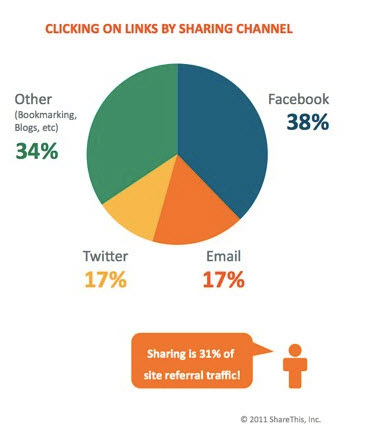
I came across a recent article in Bulldog Reporter’s Daily Dog titled, “Your Customers are Sharing Content – Are You?” which points out the various ways people share content. According to a recent Pew Research report, sharing is one of the most integral activities associated with online news. And because of today’s desire to share content, businesses can leverage this behavior to drive website traffic and referrals.
At Communiqué PR, we are constantly sharing online content such as blogs, videos and articles that we think might be valuable to our clients and colleagues. So just how effective is sharing? Share This, an online platform for sharing and influence, released a study of online social sharing behaviors and discovered the following:
• Sharing generates almost half of the traffic for websites and brands
• Sharing also accounts for 31 percent of referral traffic
• On average, shared links are clicked on 4.9 times
• Everyone who shares is an influencer on that specific topic
• Sharing is a viable marketing solution for reaching audiences when they are most receptive to a particular category of content or information
Sharing can take place on a variety of platforms. Companies can utilize social media, or their company website or blogs to encourage sharing. However, many companies are not taking advantage of this opportunity. One easy solution is to consider a website share button. This makes it simple for visitors to share the content on your website with friends. Yet today, only 34 percent of Fortune 100 companies have share buttons on their websites and 13 percent have share buttons on their newsroom content. The numbers are even lower for smaller companies.
In an age of online information overload, people look to those they know to recommend content so they do not have to sift through the sea of information themselves. Consider connecting your company’s blogs, press releases and news articles to social media, making it easier for people to share your information and increase your brand awareness. It is now more important than ever to reach out to credible influencers to help distribute your content. The chances are, your customers are sharing content, and you should be too.
While on a press tour in May, my client and I found ourselves with about five hours of time on a Monday morning in Washington, D.C. I suggested we find a coffee shop with free Wi-Fi and catch up on work and email, but my client had another idea. He suggested we do a bit of sightseeing around the Capital. We visited the Lincoln Memorial, the Vietnam Memorial and the National Cathedral. It was a wonderful break, taking us well out of our normal business routine and giving us a chance to relax some before a series of intense meetings.

Given this recent experience, I was intrigued by a blog post by Peter Shankman, creator of “Help A Reporter Out” (HARO), about “How to get some fun out of a business trip, no matter how little time you have.” Peter’s busy schedule requires him to spend as many as 300 days on the road for business, and he is able to handle this because he makes certain to have fun on every trip.
Peter says, “People ask me the last time I took an honest-to-goodness vacation, and I can’t remember. I think it was a few years ago? No idea. My last business trip, though? Well, I’m on one right now.”
Whether you have a spare hour or a few extra days, Peter has suggestions for how to make the most of your surroundings and have some fun. His suggestions range from booking spa treatments, to walking tours to take in local sites, to visiting museums or parks. When you have 12 or more hours that you can fill with something fun, he strongly urges doing some planning. A good plan will enable you to do side trips and plan other more elaborate fun activities and ensure you maximize your time.
It is excellent advice to build in some time for fun while on the road for business. Having down time is important. It can help road warriors manage stress and enable them to be more effective when working.
I am now a convert to Peter’s philosophy. If you need ideas for your next trip, I highly encourage you to read his full post and check out the comments. A number of people chimed in with some excellent suggestions for cities around the world. What is your philosophy around combining work and play? What is the most unique experience you had on a business trip?

Since its inception, video blogging has gained widespread popularity. With equipment becoming more affordable, editing software more accessible, and sites like YouTube and Facebook readily available to share content, the process is easier than ever. There is a large demand for video content – YouTube gets more than two billion hits per day – and it’s undeniable that videos are one of the fastest growing segments in the blogosphere. But how can your business leverage this trend?
At Communiqué PR, we get a variety of requests from clients that want to start blogging. Adding videos is an effective tool to keep your readers engaged. Visual elements help to diversify content and, in a world of content overload, it can be an easy way to deliver the information your audiences want quickly. Well-crafted video blogs that are updated regularly can increase your company’s web presence, improve customer communication and drive sales.
We thought it might be helpful to provide a few key points to keep in mind when developing a video blog for your business.
- Keep it short. Just like the length of a traditional blog varies, so do video blogs. But it is important to understand that many people viewing videos have a short attention span. We recommend keeping video blogs to two minutes or less. This may seem like a short amount of time to get your point across, but by organizing your thoughts beforehand, and leading with your most compelling sound bites, this will help to engage your viewers.
- Find visually appealing elements. If you track which videos receive the most hits on sites such as YouTube you will notice they are ones that are controversial, comical or visually stimulating. Video blogs follow a similar premise. We recommend selecting a visually interesting background, avoiding solid white walls, or doing a hands-on “show and tell.” For example, developing a video demo that illustrates the new functions of a product is a great way to utilize video blogging for your business.
- Work on delivery. Pay close attention to body language and voice inflection. These are your most valuable tools when the camera is on you. Do not use excessive hand gestures and pause to emphasize your key points. Also, do not allow the on-camera personality to wear distracting clothing or wild colors. (For tips on dress, check out our blog “Why Style Matters.”)
A good example of video blogging can be found on Seattle Mama Doc. Dr. Wendy Sue Swanson with Seattle Children’s Hospital does a nice job with the three tips included above. Her blogs are traditionally under two minutes, contain visually compelling elements and Dr. Swanson does an excellent job using body language and voice inflection to emphasize her points.
By considering these tips, your business could benefit greatly from crafting compelling video blogs, which help add depth to a website and create a more personal company image. Stay tuned for our upcoming post on tips for producing video blogs. Do you have a favorite blog or video blog? Please feel free to post them in the comments section.
Despite the fact that many people are using Twitter as an integral part of their companies’ marketing and public relations campaigns, many folks may not know why it’s important or how to best navigate the service. Computerworld came out recently with an interesting article titled, “How and why to search Twitter,” which shed some valuable light on the topic.
Twitter now boasts more than 200 million users worldwide, which represents huge potential in terms of marketing reach and diversity of target audiences. A simple search of Twitter can provide insight into how a product launch is going, what announcements have been made, trade shows, or even what a prospective target audience likes to talk about. With more than 140 million tweets per day, it’s possible to discover a plethora of useful information. But how does a person dig through all that data without suffering from information overload?
Computerworld listed several steps for how to search Twitter:
- Use search.twitter.com – Twitter’s proprietary search function lets you easily type in your query and search for the name of a product, person, topic, specific Twitter username, or a hashtag.
- Leverage Google and Bing – Google’s Realtime search lets users peruse content posted on social networks including Twitter, Facebook and FriendFeed. It also lets you organize content geographically when selecting the “nearby” option. Separately, Bing has a similar search experience called Bing Social, which has much of the same functionality of Google.
- Get Specific – Twitter has an advanced search page that makes it easy to use Boolean search, or find locations or specific usernames. There is also a “cheat sheet of search operators” if you need help narrowing down your search.
- Use Search Widgets and Tools – There are many different search widgets and tools, both for smartphones and desktop computers. Computerworld recommends checking out Hootsuite, a customizable interface that allows users to manage more than one username; Klout, a tool that allows companies to track trends and visual influence; and, Trendrr, a powerful dashboard that lets users analyze social activity across a variety of social mediums.
By gaining a more thorough understanding of Twitter and how best to search through the vast amount of data available via the site, marketers can unlock new audiences and join the conversation with potential customers and partners.
What sites or tools do you use to hone in on the social activity that is most relevant to your audience? We’re always learning about new tools and tips, and would love to hear what works for you.